
Amazon SageMaker 推出训练会话 API,无需管理 GPU 即可自定义训练循环
Write your own training loop — without managing GPUs — with Amazon SageMaker training session APIs
Amazon SageMaker 推出训练会话 API,允许用户无需管理 GPU 即可自定义训练循环,通过 Python 脚本控制训练过程,SageMaker AI 负责运行基础设施。同时发布了 SageMaker 训练会话食谱,提供可运行的 SFT 和 RL 脚本。
Fine-tuning a large language model (LLM) today usually forces a tradeoff between training loop control and operational simplicity. With fully managed services you select a base model, provide data and hyperparameters, and the service owns everything else, which works well when a standard, prepackaged recipe fits your problem. Less managed services give you more control, but you also manage more of the underlying infrastructure and training frameworks. Sometimes a standard recipe isn’t enough: you need a custom loss or data curriculum for supervised fine-tuning (SFT), your own preference optimization, a reinforcement learning (RL) reward function, or an alignment algorithm published last week. As soon as you need to shape the training procedure yourself, you take on that infrastructure work to gain algorithmic freedom.
Today, serverless model customization in Amazon SageMaker AI expands with training session APIs, which remove that tradeoff by drawing the abstraction boundary one level lower. Instead of abstracting away the algorithm, they abstract away the compute. Operations like forward_backward(), optim_step(), and sample() become SageMaker API calls that you compose into whatever procedure your technique requires: SFT, preference optimization, RL, or something new. The calls target a live, stateful session, so the model stays loaded on the GPUs across steps, and you drive as many calls as you need against it. The service handles runtime setup, distributed execution, gradient synchronization, fault recovery, tenant isolation, and the operations of running GPUs at scale. You write the training loop, and SageMaker AI runs the infrastructure.
Alongside the service, we’re releasing the SageMaker training sessions cookbook, a set of ready-to-run SFT and RL recipes that you can use as blueprints for your own training loops.
In this post, we introduce the programming model and the three SDK clients, and show where training session APIs fit among the model training and customization options in SageMaker AI. We then take apart a minimal RL loop on grade-school math problems (GSM8K) to show how the operations fit together and finish with a real-world workload from the cookbook: reinforcement learning on competitive programming problems, where generated code is graded by running it against unit tests.
What are SageMaker AI training session APIs?
With SageMaker AI training session APIs, you can drive a live, GPU-backed session from your own Python process on your local machine. You call the operations, and SageMaker AI runs them on managed accelerators loaded with your chosen base model plus your Low-Rank Adaptation (LoRA) adapter. There’s no config file describing the whole job up front and no cluster creation step. You control what happens at each step, interactively, from code, so you can iterate and debug quickly.
The division of responsibilities looks like this:
| You focus on | You write | SageMaker AI handles |
| Your data, RL environments, agents, and algorithm | A Python training loop that calls operations such as forward_backward(), optim_step(), and sample() for the steps that need GPUs |
GPU allocation, model and LoRA loading, distributed execution, fault recovery, checkpoint storage, security |
The API is organized around three clients in the SageMaker Python SDK, created in sequence. A ServiceClient holds the platform-level settings (execution role, model package group, Amazon Simple Storage Service (Amazon S3) output location, and optionally an AWS Key Management Service (AWS KMS) key and virtual private cloud (VPC) configuration, which you can also override per session) and starts a session. The ServiceClient instantiates a TrainingClient (training and checkpointing operations such as forward, forward_backward, optim_step, and save_weights_for_sampler), which in turn instantiates a SamplingClient (sample and compute_logprobs, for generation and scoring during rollouts and evaluation). Each API call maps to one operation in your loop. An active session also serves an OpenAI-compatible chat completions endpoint, so existing OpenAI client code can sample from it.
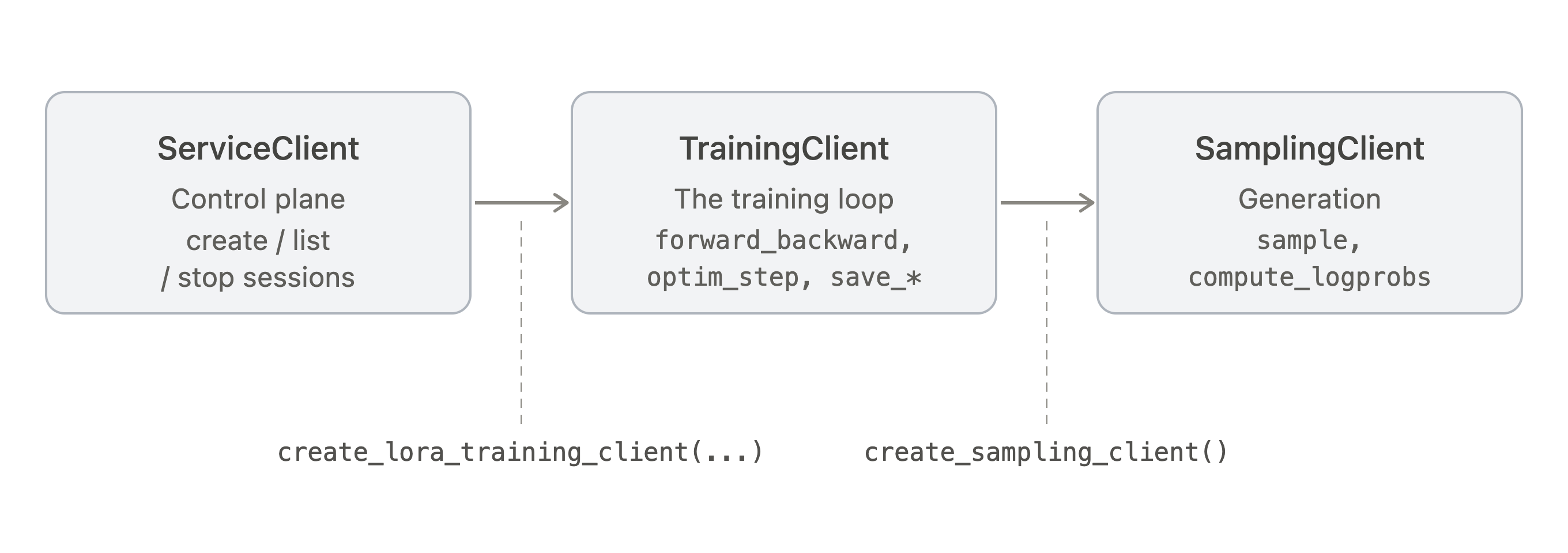
Figure 1: The SageMaker Python SDK client hierarchy for training session APIs
For reinforcement learning, the loop has a characteristic shape. The following figure shows one training step and where each part runs: the steps in green call APIs on service-managed GPUs, and the steps in purple, your loop control and reward logic, run on your machine.
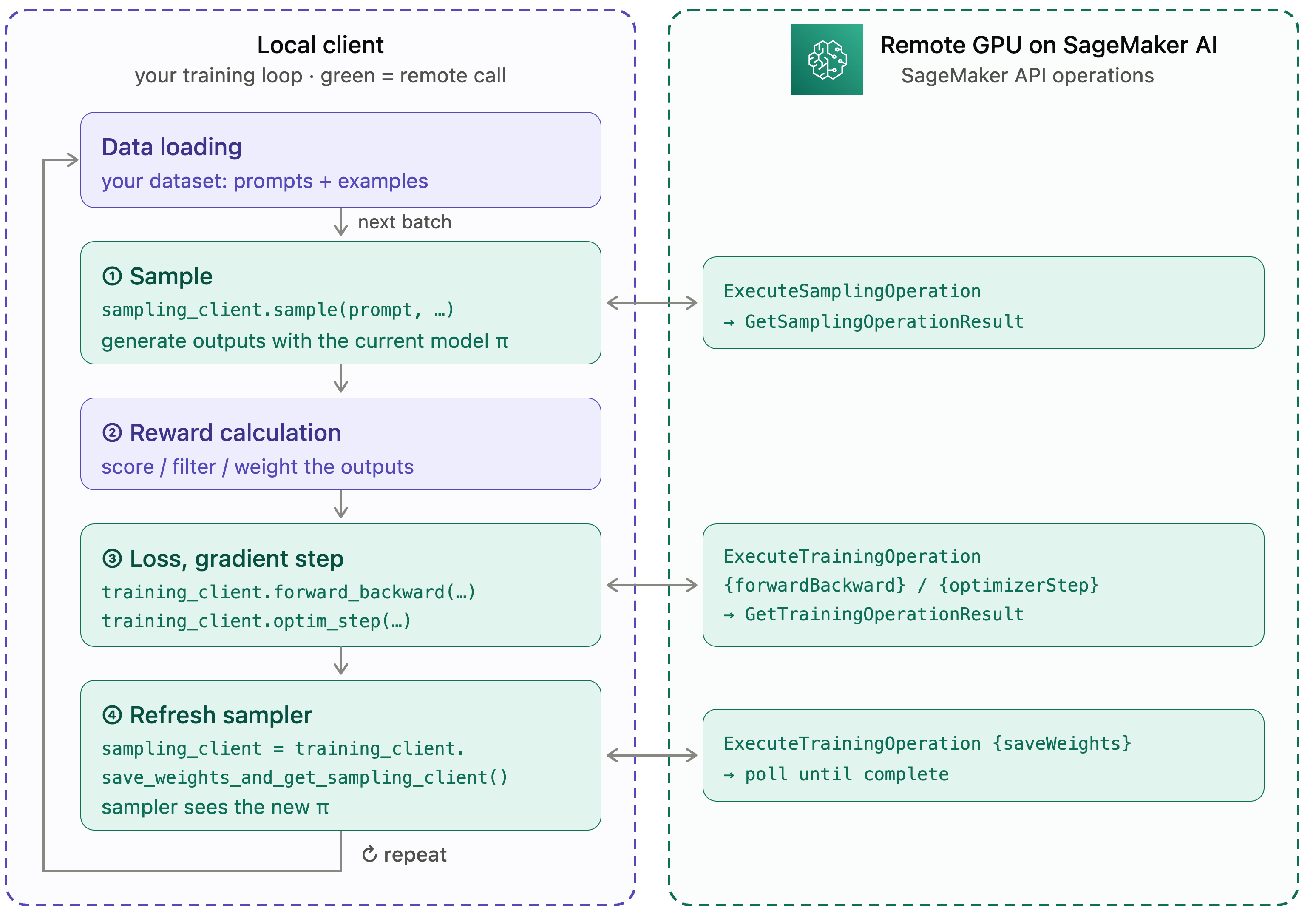
Figure 2: One training step, with sampling, gradient, and checkpoint operations on managed GPUs and loop control and reward logic on your machine
Each step loads a batch of prompts and (1) samples from the current model on the GPU. Your Python code then (2) scores those outputs: a verifier, a reward-model call, a test harness, anything you can express in code. (3) forward_backward and optim_step turn the scores into a gradient update on the GPU, and (4) save_weights_and_get_sampling_client() refreshes the sampler so the next step draws from the updated model.
You own the data, the loop control, and the reward; SageMaker AI runs the GPU-bound sampling, gradient, and checkpoint operations. The same primitives cover supervised fine-tuning (SFT) and other LLM training techniques. For SFT, drop the sampling and reward steps and call forward_backward with a cross_entropy loss over labeled examples.
Who is this for and where does it fit within Amazon SageMaker AI?
Training session APIs are the right starting point when you need fast iteration cycles and algorithmic freedom, such as a custom loss, a new RL reward signal, or a multi-stage pipeline, but don’t want to provision or operate GPU infrastructure yourself.
Usage is billed per token processed, so you’re charged only for the compute your loop consumes. If your reward function takes 10 seconds to score a batch on your machine, no GPU time is billed while it runs. Compared with hourly GPU billing, this has two practical advantages. First, there’s no idle-GPU cost: reward computation, data loading, logging, and debugging happen off the clock, and you’re billed only when you call a GPU-bound operation. Second, cost scales with your dataset and generation volume, not with wall-clock time or cluster size, which makes spend easier to forecast and experiments easier to compare. The savings over reserving GPUs for the full session can be significant for workloads with heavy local computation, such as complex reward models, multi-tool agentic rollouts, or human-in-the-loop evaluation.
Training session APIs are built for teams whose work is defined by the training algorithm, not only the dataset. Because you compose the loop yourself, the same primitives support supervised fine-tuning (SFT) with a cross_entropy loss over labeled data, reinforcement learning with ppo, importance_sampling, or cispo (GRPO, PPO, and other group-relative methods), and custom objectives, such as preference optimization or distillation, built from the same pieces. They fit:
- Post-training and alignment researchers implementing RL methods (GRPO, PPO, importance-sampling variants), custom advantage estimators, or new objectives.
- Teams doing supervised fine-tuning or preference optimization who need a non-standard loss, a data curriculum, or a multi-stage pipeline that config-driven recipes don’t express.
- Agentic and multi-turn RL builders who need custom rollout logic, reward shaping, and curricula.
- Machine learning (ML) engineers who’ve outgrown config-driven fine-tuning but don’t want to own the operational burden of GPU clusters.
- Researchers porting existing training-loop code, since the operation-based programming model maps directly onto loops written against low-level
forward_backward,optim_step, andsampleAPIs.
The supported base models and the AWS Regions where each is available are listed in the training session APIs documentation.
Where training session APIs fit within Amazon SageMaker AI
Training session APIs sit at a distinct point among the model customization options in SageMaker AI: substantially more control over the training algorithm than fully managed Serverless Model Customization, and far less operational ownership than training on Amazon SageMaker Training Jobs or Amazon SageMaker HyperPod.
| Option | Control over training | Infrastructure |
| SageMaker Serverless Model Customization – Managed APIs | Low – pick a model, configure available hyperparameters and supply data | Serverless, no instance selection |
| SageMaker Serverless Model Customization – SageMaker AI training session APIs | High – you write the loop, call primitives | Serverless, no instance selection |
| SageMaker Training Jobs | Full | Managed, ephemeral jobs where you select instance type |
| SageMaker HyperPod | Full | Managed, persistent clusters with advanced fault recovery |
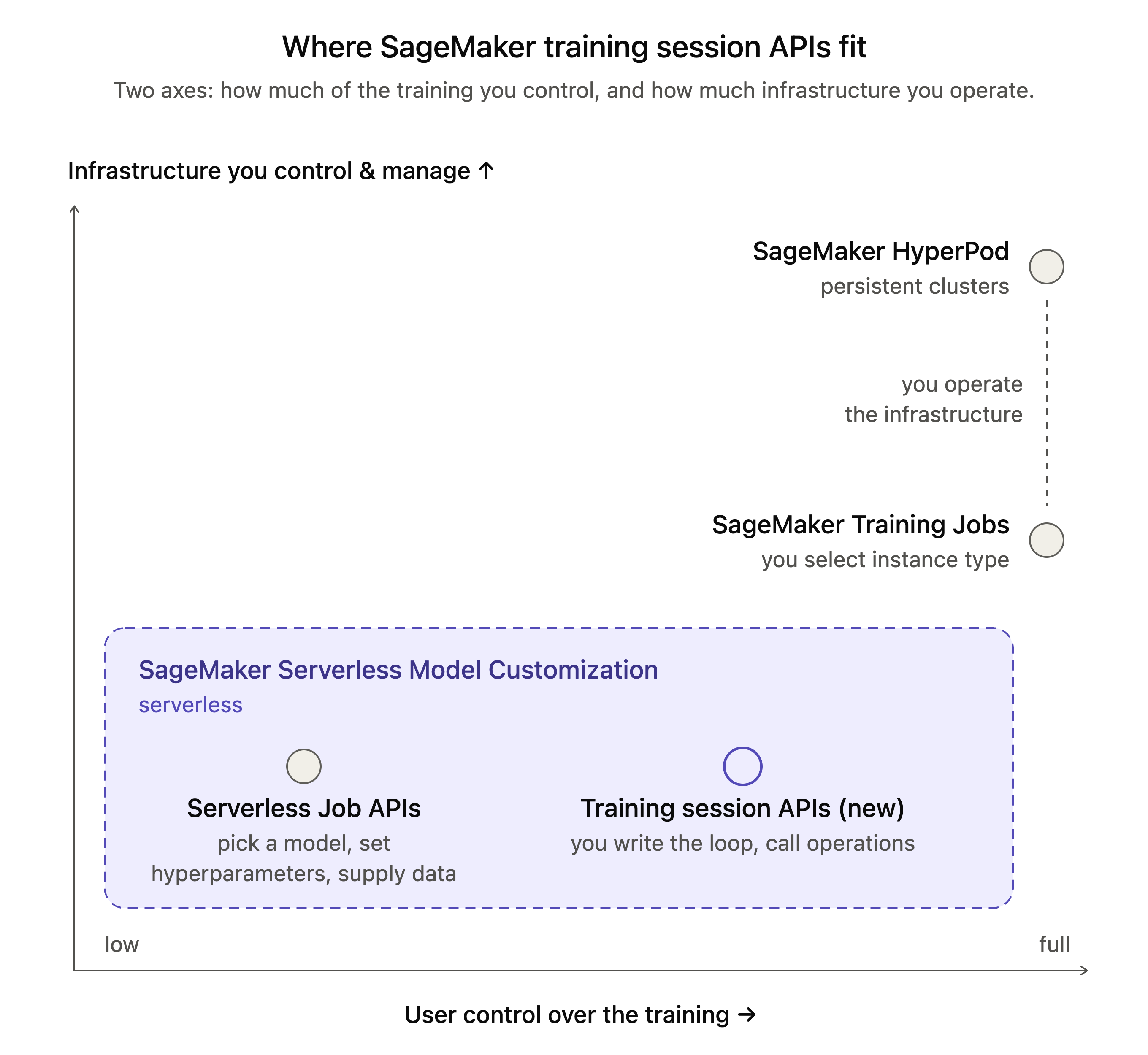
Figure 3: Where training session APIs fit among the model customization options in SageMaker AI
Anatomy of a training loop: GRPO on math problems
This section takes apart a minimal reinforcement learning loop to show how the operations fit together. The task is GSM8K, a benchmark of roughly 8,500 grade-school math word problems, each with a single numeric answer, as in the following example:
Natalia sold clips to 48 of her friends in April, and then she sold half as many clips in May. How many clips did Natalia sell altogether in April and May? → 72
We train a LoRA adapter for OpenAI’s GPT-OSS 20B with Group Relative Policy Optimization (GRPO): for each question the model generates several responses, each response is scored for correctness, and responses that beat the group’s average are reinforced. The complete, runnable example is in the Amazon SageMaker examples repository.
Before you open a session, complete the prerequisites in the documentation.
Open a session
Create a session, then get the tokenizer and a SamplingClient from it:
from sagemaker.train.training_session import ServiceClient, SamplingParams, AdamParams

svc = ServiceClient(role_arn=role, region=REGION)

training_client = svc.create_lora_training_client(
    "openai/gpt-oss-20b",                        # a name from svc.list_base_models()
    training_session_name=SESSION_NAME,
    rank=32, alpha=64,                           # LoRA rank and scaling factor
    model_package_group_arn=MODEL_PACKAGE_GROUP_ARN,
    s3_output_path=OUTPUT_S3_PATH,
)
tokenizer = training_client.get_tokenizer()
sampling_client = training_client.create_sampling_client()
Define the reward and the advantage
The task-specific logic is two short functions that run on your machine:
def compute_reward(response_text, ground_truth):
    predicted = extract_answer(response_text)      # parse the number after "#### "
    return 1.0 if predicted == ground_truth else 0.0

def compute_advantages(rewards):
    rewards = np.array(rewards)
    advantages = rewards - rewards.mean()          # center within the group (the GRPO baseline)
    return advantages / (rewards.std() + 1e-8)     # normalize
The loop
Each step follows the four stages shown in Figure 2. draw, build_prompt, and build_training_datum are short helpers in the sample:
for step in range(NUM_STEPS):
    datums, pending = [], []
    # (1) sample K responses per question in one request each (GPU); returns a future right away
    for question, ground_truth in draw(PROMPTS_PER_STEP):          # data loading is local
        prompt = tokenizer.encode(build_prompt(question), add_special_tokens=False)
        pending.append((prompt, ground_truth, sampling_client.sample(
            prompt, num_samples=K,
            sampling_params=SamplingParams(max_tokens=512, temperature=0.7, top_p=0.9))))

    for prompt, ground_truth, future in pending:
        result = future.result()                                    # wait once the batch is in flight
        # (2) score each response, then center the rewards within the group (local)
        rewards = [compute_reward(tokenizer.decode(s.tokens), ground_truth) for s in result.sequences]
        advantages = compute_advantages(rewards)
        datums += [build_training_datum(prompt, s, a) for s, a in zip(result.sequences, advantages)]

    # (3) one gradient step over the batch (GPU); the optimizer step is sequenced behind it
    fwd_bwd_op = training_client.forward_backward(datums, loss_fn="ppo")
    optim_op = training_client.optim_step(AdamParams(learning_rate=1e-5))
    fwd_bwd_op.result(), optim_op.result()

    # (4) refresh the sampler so the next step's rollouts come from the updated policy (GPU)
    sampling_client = training_client.save_weights_and_get_sampling_client()

training_client.stop()
Three details make this loop work:
Operations return futures. Every GPU-bound call returns an APIFuture immediately: the request is queued and sent by a background submitter, and .result() waits for the value. The loop submits all of a step’s sampling requests before waiting on any of them, so the whole batch generates concurrently. Training operations run in the order you call them, so optim_step can be submitted before forward_backward has finished.
The datum carries everything the loss needs. build_training_datum packs the prompt and response tokens, the per-token logprobs from sample(), the advantage, and a weights mask that keeps the prompt out of the loss.
Checkpoints are model packages. Every save registers a version in your model package group, including the per-step sampler refresh in the loop above. After training, two more saves add a merged model for deployment and a resumable state with weights and optimizer.
training_client.save_weights_for_sampler(merge_weights=True).result()   # merged, deployable model
training_client.save_state().result()                                   # resumable state (weights + optimizer)
To resume, start a new session from the latest checkpoint with create_training_client_from_state_with_optimizer.
A running session counts against your concurrent-session quota until you call stop() or it expires, so stop it when you finish, including in error paths, or open the client in a with block. The merged checkpoint deploys to a real-time endpoint. To serve checkpoints as LoRA adapters instead, see the cookbook’s deployment notebook.
In our run of the sample, 10 training steps on 40 problems took held-out accuracy from 56 percent to 75 percent.
A real-world workload: RL on competitive programming
GSM8K keeps the mechanics visible, but a production RL workload adds more: longer generations, multi-turn interaction, an external grader, and enough throughput to keep the GPUs busy. The SageMaker training sessions cookbook packages that engineering into reusable training loops built on the same operations. For a new RL task you write an environment: what the model sees, how its answer is scored, and whether it gets another turn. The cookbook handles batching, chat templates, advantage estimation, overlapped sampling and training, validation, checkpointing with resume, and per-step metrics, and records each run’s configuration so it can be repeated. The code_rl recipe uses it to train a model on competitive programming problems.
The task. Problems come from the DeepCoder dataset (PrimeIntellect, TACO, and LiveCodeBench for training; Codeforces and LiveCodeBench for testing). The model writes a Python solution, which runs against the problem’s unit tests in a SandboxFusion container on your machine. The reward is 1 when all tests pass and 0 otherwise, with a 0.1 penalty when the response contains no code block.
Multi-turn tool use. With two turns, the model can call a check_solution tool, read the test results, and revise its answer before the final grade. The tool calls and results are rendered in the model’s native chat format, so the model is trained on the same token format it uses at inference.
What the recipe adds to the minimal loop:
- Overlapped sampling and training: Rollout workers keep generating while the trainer runs a step. A group of responses sampled from an older policy is used if it’s at most k steps old and requeued otherwise, and the
cispoloss corrects for the policy difference. - Streamed gradient computation:
forward_backwardis submitted in sub-batches as groups finish, instead of once per step. - Held-out validation, checkpoint resume, and per-step metrics, optionally published to SageMaker managed MLflow.
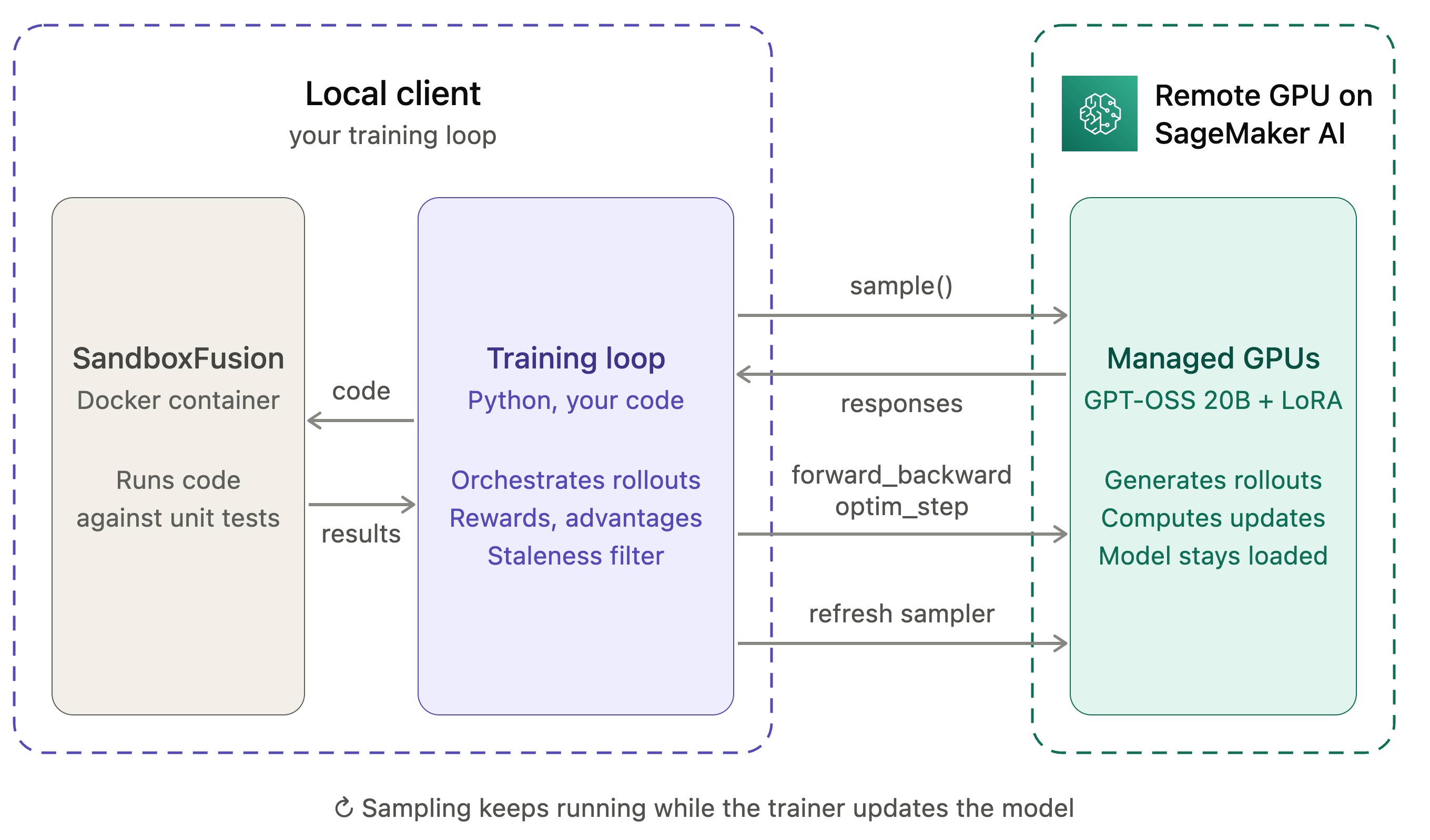
Figure 4: The Code RL setup, with the local training loop and sandbox on the left and managed GPUs on the right
We trained a LoRA adapter (rank 32) for GPT-OSS 20B for 50 steps, each with 128 problems and 8 responses per problem, using two turns and a staleness bound of k=3. Training reward rose from 0.46 to 0.60, and accuracy on 200 held-out test problems rose from 40 percent to 50.5 percent.
To run it, start the sandbox and launch the recipe:
bash tools/sandbox_up.sh
python -m training_sessions_cookbook.recipes.code_rl.train \
    --config training_sessions_cookbook/recipes/code_rl/configs/coderl_oss20b_service.json \
    --max_steps_off_policy 3 --stale_policy requeue --num_rollout_workers 80 --max_steps 50 \
    --base_model_arn "$BASE_MODEL_ARN" \
    --model_package_group_arn "$MODEL_PACKAGE_GROUP_ARN" \
    --role_arn "$ROLE_ARN" \
    --output_s3_path "$OUTPUT_S3_PATH"
The cookbook has more recipes on the same structure including supervised fine-tuning on chat datasets (Tulu 3, UltraChat), RL on GSM8K at full scale, and KTO preference alignment from binary feedback. Each recipe README lists its commands, hyperparameters, and expected metrics.
Conclusion
SageMaker AI training session APIs move the abstraction boundary down to the training operation: you write the training loop in Python on your own machine, and the service runs it on managed GPUs, handling model and LoRA loading, distributed execution, fault recovery, and checkpointing. A complete GRPO loop comes down to four operations, sample, forward_backward, optim_step, and save_weights_and_get_sampling_client, with the reward and advantage logic in your own code. The same operations scale to multi-turn, tool-using RL with sandboxed grading, as the Code RL recipe shows.
Custom rewards, agentic rollouts, step-by-step debugging, and new published techniques all use the same programming model: the algorithm stays in your loop, and SageMaker AI runs the GPUs.
To get started:
- Pick a recipe from the SageMaker training sessions cookbook, such as Code RL.
- Run the GSM8K example from the Amazon SageMaker examples repository and swap in your own reward function.
- Read the training session APIs documentation for prerequisites, quotas, Regions, supported models, and the API reference.
Acknowledgements
Thanks to Arun Nagarajan, Xichao Wang, and Shruti Sharma for their contributions and guidance for this post.
About the authors

Nicolas Jourdan
Nicolas is a Senior AI/ML Specialist Solutions Architect at AWS based in Frankfurt, Germany. He supports customers building AI and machine learning workloads on AWS, from early design decisions through to production. His focus areas include model customization, distributed training, and inference. Before joining AWS he worked as a research scientist and engineering manager on applications in autonomous driving, drones, and manufacturing, and he holds patents in object detection and anomaly detection.

Bruno Pistone
Bruno is a Senior Worldwide Generative AI/ML Specialist Solutions Architect at AWS based in Milan, Italy. He works with AWS product teams and large customers to help them fully understand their technical needs and design AI and machine learning solutions that take full advantage of the AWS cloud and Amazon ML stack. His expertise includes distributed training and inference workloads, model customization, generative AI, and end-to-end ML. He enjoys spending time with friends, exploring new places, and traveling to new destinations.

Giuseppe Angelo Porcelli
Giuseppe is a Principal Machine Learning Specialist Solutions Architect for Amazon Web Services. With several years of software engineering and an ML background, he works with customers of any size to understand their business and technical needs and design AI and ML solutions that make the best use of the AWS Cloud and the Amazon Machine Learning stack. He has worked on projects in different domains, including MLOps, computer vision, and NLP, involving a broad set of AWS services. In his free time, Giuseppe enjoys playing football.

Pooja Karadgi
Pooja is a Senior Product Manager at AWS, leading model customization for Amazon SageMaker AI. She focuses on making foundation models accessible and practical for production use, helping customers adapt them to their specific domains through techniques such as reinforcement learning. She has also worked on developer and admin experiences in SageMaker Studio, spanning the ML lifecycle from experimentation to production.
来源:AWS Machine Learning Blog · aws.amazon.com