
Qwen3 在 AWS Trainium 上使用 torchtitan 训练
Train Qwen3 on AWS Trainium with torchtitan
Qwen3 在 AWS Trainium 上通过 torchtitan 进行训练,支持使用 Transformers v5 作为建模后端,或直接使用 torchtitan 的原生 Qwen3 模型。三种配置均采用相同的 torchrun 启动模式和配置结构,可在 trn2.48xlarge 实例上实现。
Using torchtitan on AWS Trainium means using it the way you always have. TorchNeuron registers Trainium as a native PyTorch device, which lets torchtitan use it through standard PyTorch interfaces. You can use these configurations to pre-train from random initialization or fine-tune published weights. You can also customize the model implementation and kernels for your workload. In this post, you train Qwen3 three ways on a single trn2.48xlarge.
The first method uses Transformers v5 as a modeling backend in torchtitan. It runs Hub models through AutoModelForCausalLM and reads and writes published safetensors directly. The second method switches to torchtitan’s native Qwen3 by changing config.model_spec. The third adds Neuron Kernel Interface (NKI) mixture-of-experts (MoE) kernels from the torchtitan-neuron recipes and then uses torchtitan’s override registry to attach your own kernel. All three configurations use the same torchrun launch pattern and config structure.
Prerequisites
To follow this walkthrough, use a single trn2.48xlarge with either the AWS Deep Learning AMI for Neuron or a Neuron PyTorch training container. Both environments provide the Neuron driver, runtime, and compiler required to train on Trainium.
Before you install torchtitan-neuron, check whether your environment already includes it. The following command prints the installed version and package path:
python3 -c "import torchtitan, torchtitan_neuron; print(torchtitan.__version__, torchtitan_neuron.__file__)"This walkthrough uses the versions in the following table. To reproduce the examples, pin these versions. The Transformers v5 integration and Trainium-specific override modules can change between torchtitan releases.
| Component | Version |
| Instance | trn2.48xlarge, 16 Trainium2 accelerators, 128 physical NeuronCores |
| Logical NeuronCores | 64 at LNC=2 |
| torch, torch_neuronx | 2.14.0, 2.14.3 |
| transformers | 5.16.0 |
| torchtitan-neuron | release-2.33 (0.2.2+neuron.1) |
When torch_neuronx is installed, TorchNeuron registers Trainium as the neuron device and torchtitan detects it at startup. In eager mode, Neuron compiles operations as they execute. With torch.compile, Neuron compiles the captured graph. This same launch pattern works across all three configurations.
For the versions used in this walkthrough, install torchtitan-neuron and torchtitan’s remaining dependencies with --no-deps to preserve the Neuron build of torch:
git clone https://github.com/aws-neuron/torchtitan-neuron
cd torchtitan-neuron
pip install -r requirements.txt
Before you start training, get the Qwen3 model artifacts from Hugging Face Hub. Store them in a local directory that you can pass to the training config:
hf download Qwen/Qwen3-4B-Instruct-2507 \
  --local-dir "$PWD/assets/hf/Qwen3-4B-Instruct-2507"
Each training configuration is a Python config function. The three examples start from a base config that you update for each step.
Train with Hugging Face Transformers v5
In the first configuration, Transformers v5 builds Qwen3 through AutoModelForCausalLM. The Hub model definition supplies the implementation used for the forward and backward passes. You select the model by setting its Hub ID in the config.
Start with transformers_modeling_backend_full(). It leaves the fields that map to Hugging Face configuration keys unset, so AutoConfig.from_pretrained() loads the model architecture from the Hub.
Create neuron_qwen3.py in the torchtitan-neuron repository root, where you run the training command. Add the imports, model artifact path, and base config:
import os
from torchtitan.experiments.transformers_modeling_backend.config_registry import (
    transformers_modeling_backend_full,
)
from torchtitan.experiments.transformers_modeling_backend.configs import (
    TransformersBackendConfig,
)

ASSETS = os.path.abspath("./assets/hf/Qwen3-4B-Instruct-2507")

def v5_qwen3_4b() -> TransformersBackendConfig:
    config = transformers_modeling_backend_full()
    config.hf_model = "Qwen/Qwen3-4B-Instruct-2507"
    config.hf_assets_path = ASSETS
    config.dataloader.dataset = "c4_test"
    config.training.steps = 10
    config.training.local_batch_size = 1
    config.parallelism.data_parallel_shard_degree = -1
    return config
torchrun --nproc_per_node=64 --rdzv_backend c10d --rdzv_endpoint localhost:0 \
--local-ranks-filter 0 --role rank --tee 3 \
-m torchtitan.train --module neuron_qwen3 --config v5_qwen3_4bThis command launches 64 training processes, one for each logical NeuronCore. --module neuron_qwen3 imports the local config module. --config v5_qwen3_4b selects the configuration function. The data parallel setting shards the model across all 64 ranks.
Load and save Hugging Face checkpoints
To fine-tune from published weights, enable checkpoint loading and point initial_load_path to ASSETS. The state-dictionary adapter adjusts the leading model. prefix and handles tied embeddings. It saves the final checkpoint as Hugging Face safetensors.
def v5_qwen3_4b_finetune() -> TransformersBackendConfig:
    config = v5_qwen3_4b()
    config.checkpoint.enable = True
    config.checkpoint.folder = "checkpoint_qwen3_4b_ft"
    config.checkpoint.initial_load_path = ASSETS # absolute path required
    config.checkpoint.initial_load_in_hf = True
    config.checkpoint.initial_load_model_only = True
    config.checkpoint.last_save_in_hf = True
    config.checkpoint.last_save_model_only = True
    return config
Use the first training-step loss as a quick check that torchtitan loaded the published weights. For Qwen/Qwen3-4B-Instruct-2507, the verified run produced a step 1 loss of 6.54 from published weights and 12.43 from random initialization.
After training, load the exported checkpoint with AutoModelForCausalLM and load_state_dict. A successful round trip reports no missing or unexpected keys other than lm_head.weight, which Qwen3-4B ties to the token embeddings. This confirms that the files remain a standard Hugging Face checkpoint.
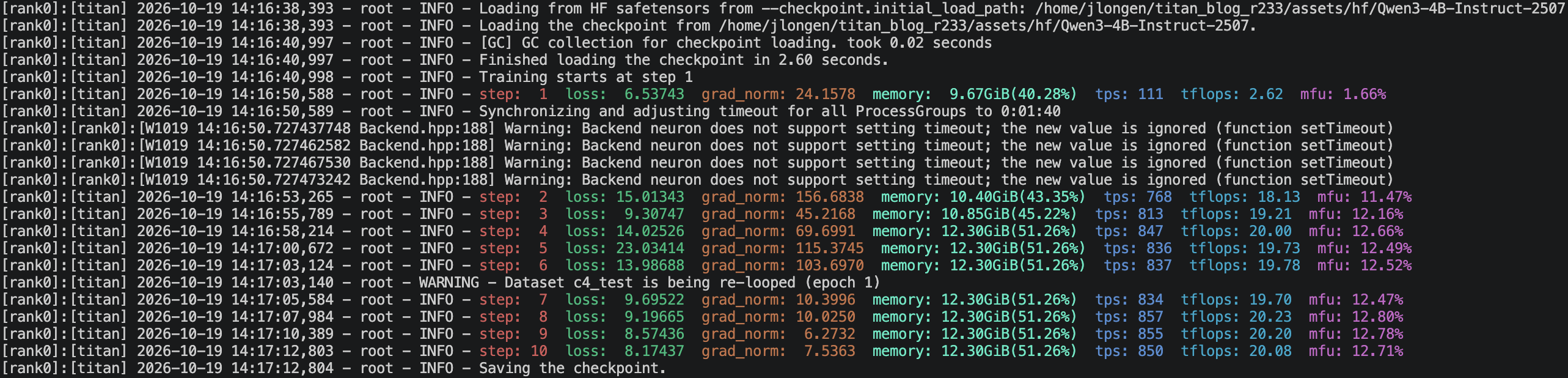
Figure 1: The published checkpoint starts with a loss of 6.54, and the exported weights load without missing or unexpected keys
Train with torchtitan’s native models
In the second configuration, torchtitan builds its native Qwen3Model. Add the native Qwen3 imports and config function to neuron_qwen3.py:
This example starts from qwen3_32b() because the tested torchtitan build does not provide a generic qwen3_4b() config builder. The next line replaces the 32B model specification with the 4B specification. The remaining fields reproduce the tested run.
from torchtitan.models.qwen3 import model_registry
from torchtitan.models.qwen3.config_registry import qwen3_32b
from torchtitan.trainer import Trainer

def native_qwen3_4b() -> Trainer.Config:
    config = qwen3_32b()
    config.model_spec = model_registry("4B", attn_backend="sdpa")
    config.hf_assets_path = ASSETS
    config.dataloader.dataset = "c4_test"
    config.training.steps = 10
    config.training.local_batch_size = 1
    config.training.global_batch_size = 64
    config.parallelism.data_parallel_shard_degree = -1
    return config
torchrun --nproc_per_node=64 --rdzv_backend c10d --rdzv_endpoint localhost:0 \
--local-ranks-filter 0 --role rank --tee 3 \
-m torchtitan.train --module neuron_qwen3 --config native_qwen3_4bconfig.model_spec selects the model class and defines how torchtitan shards the model and maps its checkpoint keys. Here, model_registry("4B", attn_backend="sdpa") selects torchtitan’s native Qwen3 implementation with scaled dot product attention (SDPA).
Add NKI kernels for mixture of experts
In the third configuration, torchtitan runs mixture-of-experts layers with kernels written in NKI, the Neuron kernel language. Add the required imports and Qwen3 MoE config function to neuron_qwen3.py:
from torchtitan.config import CompileConfig
from torchtitan_neuron.models.qwen3.config_registry import qwen3_nki_moe_config
def nki_qwen3_30b_a3b() -> Trainer.Config:
config = qwen3_nki_moe_config(
"30B-A3B",
compile_config=CompileConfig(enable=False, backend="neuron"),
n_layers=4,
num_experts=64,
top_k=4,
)
config.hf_assets_path = ASSETS
return configtorchrun --nproc_per_node=64 --rdzv_backend c10d --rdzv_endpoint localhost:0 \
--local-ranks-filter 0 --role rank --tee 3 \
-m torchtitan.train --module neuron_qwen3 --config nki_qwen3_30b_a3bThis configuration uses data parallel sharding across 64 ranks with a tensor parallel degree of 1. It does not use expert parallelism. num_experts=64 sets the number of experts in the model, not the expert parallel degree.
Setting CompileConfig(enable=False) runs this example in eager mode. TorchNeuron supports registered NKI operators in both eager execution and torch.compile.
In the torchtitan build used for this walkthrough, qwen3_nki_moe_config() replaces the MoE block with the NKI grouped-experts implementation. It also selects SDPA and the gather-free rotary embedding. When you enable torch.compile, add "grad_clip" to CompileConfig.components to compile gradient-norm clipping.
NKI kernels enter training as PyTorch operators. wrap_nki makes an NKI kernel callable from PyTorch, and nki_op registers the operator. register_autograd attaches its backward pass using routing metadata saved during the forward pass.
The example reduces Qwen3-30B-A3B to 4 layers and 64 experts so it fits on one trn2.48xlarge. It routes each token to 4 experts with top_k=4.
Attach your own NKI kernel
In some cases, you might want to optimize an operation for the tensor shapes in your model. A specialized kernel can tailor its tiling and data movement to those shapes. It can also replace a performance-critical sequence of PyTorch operations with one optimized operator. You can write the kernel yourself or start with one from nkilib. This example uses rope_hf from nkilib.core.embeddings, which expects the Hugging Face tensor layout and supports its own backward mode. This example demonstrates kernel registration and autograd integration, not a performance improvement.
Create my_neuron_kernels.py in the repository root, where you launch training. torchtitan stores query and key as [batch, seq, heads, head_dim], whereas rope_hf expects [batch, heads, seq, head_dim]. Convert the layout inside the operator and allocate the output tensors with torch.empty_like():
import torch
from nkilib.core.embeddings.rope_hf import rope_hf
from torch_neuronx import nki_op
from torch_neuronx.nki_hop import wrap_nki
from torch_neuronx.utils import get_logical_neuron_cores
LNC = (int(get_logical_neuron_cores()),)
wrapped_rope = wrap_nki(rope_hf)
@nki_op("my_kernels::rope_fwd")
def rope_fwd(query, key, rope_cache):
q = query.permute(0, 2, 1, 3).contiguous()
k = key.permute(0, 2, 1, 3).contiguous()
cache = rope_cache.reshape(-1, rope_cache.shape[-1])
q_out, k_out = wrapped_rope[LNC](
q,
k,
torch.empty_like(q),
torch.empty_like(k),
rope_cache=cache,
)
return (
q_out.permute(0, 2, 1, 3).contiguous(),
k_out.permute(0, 2, 1, 3).contiguous(),
)rope_hf computes gradients when you call it with backward=True. Register a second operator for that mode. Save the rotary cache during the forward pass so the backward pass can reuse it. Return None for the cache gradient because the cache is not differentiable.
@nki_op("my_kernels::rope_bwd")
def rope_bwd(grad_query, grad_key, rope_cache):
gq = grad_query.permute(0, 2, 1, 3).contiguous()
gk = grad_key.permute(0, 2, 1, 3).contiguous()
cache = rope_cache.reshape(-1, rope_cache.shape[-1])
out_q, out_k = wrapped_rope[LNC](
gq,
gk,
torch.empty_like(gq),
torch.empty_like(gk),
rope_cache=cache,
backward=True,
)
return (
out_q.permute(0, 2, 1, 3).contiguous(),
out_k.permute(0, 2, 1, 3).contiguous(),
)def _setup_context(ctx, inputs, output):
ctx.save_for_backward(inputs[2])
def _backward(ctx, grad_query, grad_key):
(rope_cache,) = ctx.saved_tensors
grad_q, grad_k = rope_bwd(grad_query, grad_key, rope_cache)
return grad_q, grad_k, None
rope_fwd.register_autograd(_backward, setup_context=_setup_context)Because rope_hf requires a supported sequence length, validate that constraint before calling the kernel. Subclass CosSinRoPE and call rope_fwd from apply_rotary_emb:
from dataclasses import dataclass
from torchtitan.config import derive, override
from torchtitan.models.common.rope import CosSinRoPE
class NKIRoPE(CosSinRoPE):
@dataclass(kw_only=True, slots=True)
class Config(CosSinRoPE.Config):
pass
@staticmethod
def apply_rotary_emb(query, key, rope_cache):
stride = 128 * LNC[0]
if query.shape[1] % stride:
raise ValueError(
f"rope_hf requires a sequence length that is a multiple of "
f"128 * LNC={stride}, got {query.shape[1]}"
)
q_out, k_out = rope_fwd(query, key, rope_cache)
return q_out.type_as(query), k_out.type_as(key)Register NKIRoPE as the replacement for CosSinRoPE. derive() copies the shared configuration fields into the replacement config:
@override(
"nki_rope",
target=CosSinRoPE.Config,
exact=True,
description="nkilib rope_hf kernel in place of the PyTorch rotation",
)
def _nki_rope(cfg: CosSinRoPE.Config) -> NKIRoPE.Config:
return derive(cfg, NKIRoPE.Config)To load the custom override, pass its module name to --override.imports. torchtitan imports the registry entry before it builds the model:
torchrun --nproc_per_node=64 --rdzv_backend c10d --rdzv_endpoint localhost:0 \
  --local-ranks-filter 0 --role rank --tee 3 \
-m torchtitan.train --module neuron_qwen3 --config native_qwen3_4b \
--override.imports my_neuron_kernelsBefore training starts, torchtitan logs each config node that the override replaces. Confirm that the output contains one nki_rope entry for each Qwen3 layer:
[Override] nki_rope: model_spec.model.layers.0.attention.rope CosSinRoPEConfig -> NKIRoPE.Config
[Override] nki_rope: model_spec.model.layers.1.attention.rope CosSinRoPEConfig -> NKIRoPE.Config
Set the sequence length to a multiple of 128 * LNC, which is 256 when LNC is 2. Reshape the rotary cache to [seq, head_dim * 2], with cosine values in the first half and sine values in the second. The kernel validates these constraints before training begins.
For a complete torchtitan example, see torchtitan_neuron/models/gpt_oss/nki_attention.py. It connects nkilib flash-attention kernels through the same operator and override mechanisms. It also handles DTensor inputs for tensor parallelism.
Before you train with a custom kernel, compare its outputs with the implementation it replaces. In the numerical test with float32 inputs, rope_hf and torchtitan’s PyTorch rotary embedding produced a maximum absolute difference of 0.0 for both query and key.
When you register multiple overrides, limit each one to the intended module instances with fqns. For example, fqns=["layers.1[0-9].attention.rope"] targets the rotary embedding in layers 10 through 19. torchtitan stops when two overrides claim the same node and warns when an override matches no nodes.
Review the training output
At startup, confirm that torchtitan reports 64 ranks and the expected model. The first step includes compilation and takes longer than later steps. Each training step reports the loss, gradient norm, high-bandwidth memory (HBM) usage, throughput, and model FLOPs utilization (MFU). For the checkpoint run, confirm that the first-step loss is near 6.54. For the custom kernel run, confirm that the nki_rope override appears once for each Qwen3 layer.
Scale across the instance
The same parallelism settings apply to the Transformers and native model configurations. A trn2.48xlarge exposes 64 logical NeuronCores at LNC=2. Set data_parallel_shard_degree = -1 to shard the model parameters, gradients, and optimizer state across every rank that torchrun starts.
Set config.parallelism.tensor_parallel_degree to shard each layer’s weights across a group of ranks. Each rank computes a slice of every matrix multiplication. With sequence parallelism enabled by default, normalization layers run on activations sharded along the sequence dimension. torchtitan combines tensor parallelism with Fully Sharded Data Parallel (FSDP) on a multidimensional DeviceMesh.
Watch per-rank HBM as you increase the model size, sequence length, or local batch size. These values determine how much memory each rank requires.
Clean up
If you want to keep your checkpoints, copy them to persistent storage before you clean up. If you plan to reuse the instance, stop it. When you no longer need the instance, terminate it.
Conclusion
AWS Trainium works as a supported torchtitan device across all three configurations in this walkthrough. You can train Qwen3 through Hugging Face Transformers v5 and load or save published safetensors directly. You can also train with torchtitan’s native Qwen3 implementation by setting config.model_spec. For mixture-of-experts models, use the torchtitan-neuron NKI recipes. For custom kernels, use the override registry to attach NKI operators through the same launch flow.
For setup guidance, see the AWS Neuron documentation. For current source and training recipes, see the torchtitan repository.
About the authors

Josh Longenecker
Josh is a Solutions Architect on the Annapurna Labs ML accelerator team at AWS. He helps customers design, optimize, and deploy distributed AI training and inference workloads on AWS Trainium. His technical interests include distributed PyTorch, large language model training and inference, and NKI kernels.

Alex Hoffman
Alex is a Software Engineer working on distributed training at AWS Annapurna Labs. He enables end-to-end training experiences for AWS Trainium customers on TorchNeuron with torchtitan-neuron.
来源:AWS Machine Learning Blog · aws.amazon.com